



- Messages
- 5,606
- Classified ads
- 5
This part of the how to will guide you on how to provide feedback for a buyer. The process is simple and once you become familiar with it will see its pretty straight forward. The feedback system here is fully integrated into the Classifieds system and helps the community record successful transactions. This isn't a replacement for due diligence but it's one more tool to help with identifying good/reputable members.
If a buyer leaves feedback first via Leave Seller Feedback then you'll receive a notification with feedback which will be easier to leave return feedback. If the seller initiates feedback first, then follow these steps.
Note:
If you have any questions or comments, let me know below.
Feedback for Buyers from Sellers
If a buyer leaves feedback first via Leave Seller Feedback then you'll receive a notification with feedback which will be easier to leave return feedback. If the seller initiates feedback first, then follow these steps.
Note:
- All feedback is reviewed before its posted
- Shill reviews may result in permanent ban
- Reviews caught with duplicate accounts will be banned
If you have any questions or comments, let me know below.
Feedback for Buyers from Sellers
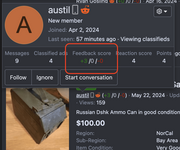
- Click or highlight the username. This can be done in conversations or listings and click on "Feedback score"
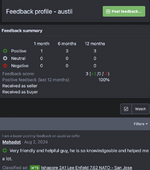
- After clicking onf Feedback score, you'll be taken to the Feedback profile page with the history of feedback.
- Click on "Post feedback".
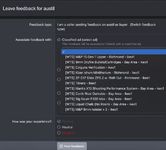
- Select "I am a seller leaving feedback for the buyer
- You'll then select the listing you want to associate with the Feedback. Feedback is tied to the listing, and listings cannot be deleted unless requested.
- Fill out the fields and Click "Post feedback"
- This will then go into a queue for review.
Last edited: