18+ Content Warning

By clicking Enter, you confirm you are 18 years of age or older and agree to comply with all applicable local, state, and federal laws.

Notice: Any content or member activity - including anything you may buy, sell, transfer, or discuss - must comply with current and upcoming laws.

Members are encouraged to stay informed: California Firearm Laws: 2026 Outlook & 2025 Recap . Responsibility for compliance rests solely with the individual member.

  • Welcome

    Welcome to CAguns

    Join California’s gun owner community. Create a free account to join discussions and explore member features.

How to post pictures from Imgur

kkh25

⚠️ New Member | No Deposits ☢️
Messages
16
How do I post photos from Imgur to my listing? It was very simple on Calguns. Just copy and paste. When I try that here, I get a pop up window the says please inter a URL number.
I can post a link to the photos in the body of the listing, that the reader can click on to be taken to the picture, but I would rather have the actual photo in the listing.
Help me Obi Wan Kenobi, your my only hope!
 
How do I post photos from Imgur to my listing? It was very simple on Calguns. Just copy and paste. When I try that here, I get a pop up window the says please inter a URL number.
I can post a link to the photos in the body of the listing, that the reader can click on to be taken to the picture, but I would rather have the actual photo in the listing.
Help me Obi Wan Kenobi, your my only hope!

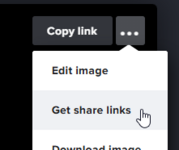
1731631418514.png
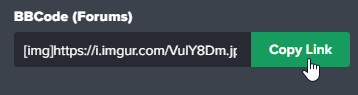
1731631433064.png
Then paste the link in the message. (keep the [img ] tags around it)
 
Last edited:
When I do that and then hit the save button, I get the message "You must upload at least 1 image attachment."
How do I do that? I found a way to get the photos to appear in the listing, but the system won't let me "Save" the post.
I get the above message.
 
Last edited:
How do you reset the cover image on a for sale listing? I can not edit it out or replace it with a different image.
 
I posted a Beretta Brigadier that was converted to decoker only. And the system inserted a eggplant emoji in the middle of the word decocker. While some folks find humor in that sort of thing, I do not. I'm trying to post a serious ad to sell a firearm. How do I stop this from happening in the future?
 
I posted a Beretta Brigadier that was converted to decoker only. And the system inserted an eggplant emoji in the middle of the word de🍆er. While some folks find humor in that sort of thing, I do not. I'm trying to post a serious ad to sell a firearm. How do I stop this from happening in the future?
Turn off the profanity filter in your preferences.
 
How do you reset the cover image on a for sale listing? I can not edit it out or replace it with a different image.
This is a known issue. I don't have a way to change that at the moment until we possibly upgrade our software.
 
The profanity box in preferences is, and has been checked when I set up my account. I did not place the emoji there. It appeared after I completed and saved the post.
And I can't remove it during editing. Any suggestions?
 
Back
Top Bottom