18+ Content Warning

By clicking Enter, you confirm you are 18 years of age or older and agree to comply with all applicable local, state, and federal laws.

Notice: Any content or member activity - including anything you may buy, sell, transfer, or discuss - must comply with current and upcoming laws.

Members are encouraged to stay informed: California Firearm Laws: 2026 Outlook & 2025 Recap . Responsibility for compliance rests solely with the individual member.

caguns.net

Welcome to CAguns.net!
Join our growing community where you can ask questions, share knowledge, or browse our classifieds section.

Sign up for a free account today and unlock full access! Once registered, you can search, post, and take advantage of exclusive features unavailable to guests.

A note on why more of the site now requires an account: automated scrapers and AI systems have been crawling our forums and classifieds at a scale. Requiring sign-in for those sections is the most effective tool we have. It takes a minute to register, it's free, and it keeps what happens here between actual members.

New to California gun ownership or trying to keep up with the changing laws? Check out our sister site CA2A.com — free courses, plain-English legal updates, and step-by-step guides built for California owners.

Advanced features are available only to registered members. Register today!

  • 📢 Classifieds Update — Effective Monday, September 21

    Starting Monday, the free Classifieds ad limit will be lowered from 3 to 2 active ads.

    Verified accounts will keep their limit of 3. All other account limits stay the same.

    Existing ads are not affected and will remain up until they expire.

    Want to keep 3 listings and add features like removing comments and emojis? Upgrade/Verify your account

    More information here

How To: How to use the Updated Classified Section!

doser

Advisor
Staff member
CAguns Vendor
CAguns Supporter
Calguns Verified
Messages
348
The classified section was updated along with our data stores, with this come some changes in how you use the search. If you are logged in, you have the option to change listing views.

From our analytics data, 80% of you are on mobile, 20% on desktop or other. So starting off with search via categories will start to limit what gets displayed.

If you like textual listings like how CG was head back to the forums and scroll through the marketplace listings to scan titles. This section is optimized for search

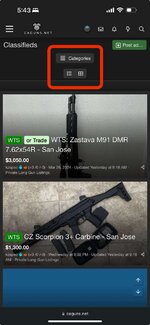
Step 1. Select Categories to start filtering.
IMG_2268.jpeg


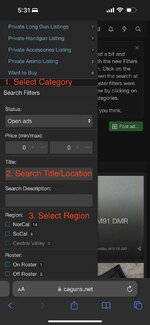
Step 2. Use the Filters. Since we’re small the filters will update automatically once selected. This may change.


IMG_2266.jpeg
 
Already a great classifieds section Doser, thank you

One thing that may be looked at is the price filtering when inputting an amount (min/max). When I select the box, the “0” value remains and doesn’t disappear when I input a number, but rather it remains static and becomes part of the inputted amount.

I did a screen recording, but I’m unsure how to upload/attach it here. Imgur maybe?
 
Already a great classifieds section Doser, thank you

One thing that may be looked at is the price filtering when inputting an amount (min/max). When I select the box, the “0” value remains and doesn’t disappear when I input a number, but rather it remains static and becomes part of the inputted amount.

I did a screen recording, but I’m unsure how to upload/attach it here. Imgur maybe?
You have you select and remove the 0 or add onto it. 0 is the default. YouTube unlisted or Imgur works for video. I don’t allow video uploads for $$ reasons. That adds up quick
 
Here we go
Yes, that's correct. You'd like it so that the 0 automatically goes away? Seems like the work around for now is to use round numbers. ie: 20,30,40,50 or do as you did and replace the 0. I'll take a look at that but that's not too bad. The problem with automatically taking out the 0, it'll automatically refresh. There has to be a field to replace since it does an ajax call for instant updates.
 
I see, yeah I noticed that it refreshes automatically as you adjust the filter choices. Just thought I’d point it out as it’s may be a creature comfort thing for the users, especially mobile users. Not a major thing, but a simple feedback on the details. Thank you Doser for the ear!
 
I see, yeah I noticed that it refreshes automatically as you adjust the filter choices. Just thought I’d point it out as it’s may be a creature comfort thing for the users, especially mobile users. Not a major thing, but a simple feedback on the details. Thank you Doser for the ear!
Yeah. This is one of those things. If i disable it you have to scroll down and hit Filter every time so that's the trade off. I appreciate you taking the time to test it out. Ultimately, we'll let the community decide when it comes time. The capability is there which was the hard part. I'll keep an eye on usage.
 
I see, yeah I noticed that it refreshes automatically as you adjust the filter choices. Just thought I’d point it out as it’s may be a creature comfort thing for the users, especially mobile users. Not a major thing, but a simple feedback on the details. Thank you Doser for the ear! g
Thanks for pointing that out! We appreciate feedback on user experience details like this. Enhancing comfort for all users, especially on mobile, is important to us. We'll look into it!
 
Some things are unissued or "new" condition, but everything is decades old and most not made anymore. I'm liquidating items acquired and collected when I was serving, 1980s-2000s, since I'm getting old now and maybe the younger CAgunners might want them.
 
Sounds reasonable me. You will likely be asked to ship first because you are international. We heavily scrutinize new users until they've built s a reputation with other members to reduce issues. So please be diligent with who you sell to. GLWS
Some things are unissued or "new" condition, but everything is decades old and most not made anymore. I'm liquidating items acquired and collected when I was serving, 1980s-2000s, since I'm getting old now and maybe the younger CAgunners might want them.=
 
Understood and thanks for the guidance. I'm an unknown here but had a good rep and the same username on the old Calguns website. I am username tryingminimalism on eBay, where I've been a member since April 1999. Not sure if that helps but FWIW.
 
Hi,
I’d appreciate some explanation of the intended use for the “ keywords” field within the Categories and or Advanced Search tools. This field does not appear to filter the posts in the manner I expect it to.

I have been using the “Keywords” field to refine my search first by the handguns for sale forum and then by firearm manufacturer. For example I enter only a single word in the “Keywords” field such as “Ruger” or “Smith” and then filter by the “last updated” field. Using these two field to narrow my search to narrow the results to one specific handgun manufacturer appeared to be giving the results I wanted.

However….I recently posted a Ruger and a Smith and Wesson M&P for sale on Caguns. I noticed that MY TWO posts do not display when I use the “ Keywords” field even though I have the words Ruger and Smith listed in both the “title” field and the “description” field of my post. My posts do display if I enter my search criteria in either the Title or Description fields in the filter menu.

So my question is…what is the intended functionality of the “keywords” filtering feature? I assumed it would search the title field, the description field and the details of all posts in the handguns for sale forum. It seems to return some results but not all.

Since the “keywords” field is listed at the top of the list of options to filter by I assume it is frequently used by most members. I would like to understand what I need to do to ensure my Ruger and Smith display for users who search for those brands.

Thank you.
 
Hi,
I’d appreciate some explanation of the intended use for the “ keywords” field within the Categories and or Advanced Search tools. This field does not appear to filter the posts in the manner I expect it to.

I have been using the “Keywords” field to refine my search first by the handguns for sale forum and then by firearm manufacturer. For example I enter only a single word in the “Keywords” field such as “Ruger” or “Smith” and then filter by the “last updated” field. Using these two field to narrow my search to narrow the results to one specific handgun manufacturer appeared to be giving the results I wanted.

However….I recently posted a Ruger and a Smith and Wesson M&P for sale on Caguns. I noticed that MY TWO posts do not display when I use the “ Keywords” field even though I have the words Ruger and Smith listed in both the “title” field and the “description” field of my post. My posts do display if I enter my search criteria in either the Title or Description fields in the filter menu.

So my question is…what is the intended functionality of the “keywords” filtering feature? I assumed it would search the title field, the description field and the details of all posts in the handguns for sale forum. It seems to return some results but not all.

Since the “keywords” field is listed at the top of the list of options to filter by I assume it is frequently used by most members. I would like to understand what I need to do to ensure my Ruger and Smith display for users who search for those brands.

Thank you.
Thanks for the example, looks like a bug I’ll check this out.. if you search Ruger LCR it pops up but I see your point where it’s not matching on the single word
 
Hello, signed up for caguns.net several months ago but still not sure how to be able to list some pew pews I have for ftf sale.
I got a notice that I have "limited Classifieds access" and to send the site staff a notice of other similar sites I have been part of, which I did a few months ago.

Is there another way to be able to post listings?
 
Back
Top Bottom