18+ Content Warning

By clicking Enter, you confirm you are 18 years of age or older and agree to comply with all applicable local, state, and federal laws.

Notice: Any content or member activity - including anything you may buy, sell, transfer, or discuss - must comply with current and upcoming laws.

Members are encouraged to stay informed: California Firearm Laws: 2026 Outlook & 2025 Recap . Responsibility for compliance rests solely with the individual member.

caguns.net

Welcome to CAguns.net!
Join our growing community where you can ask questions, share knowledge, or browse our classifieds section.

Sign up for a free account today and unlock full access! Once registered, you can search, post, and take advantage of exclusive features unavailable to guests.

A note on why more of the site now requires an account: automated scrapers and AI systems have been crawling our forums and classifieds at a scale. Requiring sign-in for those sections is the most effective tool we have. It takes a minute to register, it's free, and it keeps what happens here between actual members.

New to California gun ownership or trying to keep up with the changing laws? Check out our sister site CA2A.com — free courses, plain-English legal updates, and step-by-step guides built for California owners.

Advanced features are available only to registered members. Register today!

  • 📢 Classifieds Update — Effective Monday, September 21

    Starting Monday, the free Classifieds ad limit will be lowered from 3 to 2 active ads.

    Verified accounts will keep their limit of 3. All other account limits stay the same.

    Existing ads are not affected and will remain up until they expire.

    Want to keep 3 listings and add features like removing comments and emojis? Upgrade/Verify your account

    More information here

New Feature! Customize your "What's New" & "New Posts" feed!

This is for New Feature

doser

Advisor
Staff member
CAguns Vendor
CAguns Supporter
Calguns Verified
Messages
348
We’ve been working hard to improve your experience based on your feedback! Now, you can customize the posts you see when you click “What’s New” (both on desktop and mobile under “New Posts”).

🛠️ How It Works:
  • By Default: You’ll only see unread posts.
  • Want to see everything? Simply uncheck the “Unread” box.
Follow specific forums:
  1. Check the “Selected nodes” box.
  2. Choose the forums you want to follow.
  3. Enjoy your personalized feed!
  4. Check "Save as Default"

This update gives you more control, allowing you to filter your feed and focus on the content you care about most.

Give it a try and let us know what you think!

Mobile button
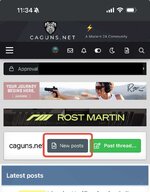
IMG_7682.jpeg

This will open up a list of new posts. Navigate toe the red box and click on Filters.
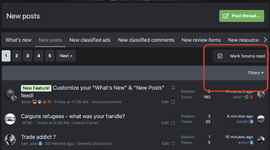
Screenshot 2025-02-16 at 12.22.32 PM.png


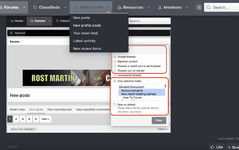
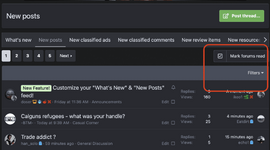
Desktop Button (You can also use the New Posts button)
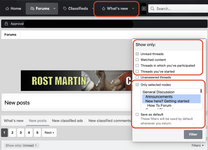
Screenshot 2025-02-14 at 11.20.22 AM.png
 
Last edited by a moderator:
This isn't on my screen in the "What's new" or "Forums" page. Where ya hiding it? (Windows 11, MS Edge)

Follow specific forums:
  1. Check the “Selected nodes” box.
 
@ikeo1 Maybe it’s just me, but I’d like to have Classifieds as an option to add to my “what’s new” feed. I know some may not want it, but I can’t help myself when I find a deal. Even if I don’t need it! And this would negatively affect me by forcing me to see the classifieds, but I’d still enjoy it 😂
 
@ikeo1 Maybe it’s just me, but I’d like to have Classifieds as an option to add to my “what’s new” feed. I know some may not want it, but I can’t help myself when I find a deal. Even if I don’t need it! And this would negatively affect me by forcing me to see the classifieds, but I’d still enjoy it 😂
You can customize it so it pulls that if you want

Add the marketplace nodes in there and they’ll pop up. Only new items will populate in I think. Otherwise just click Classifieds lol
 
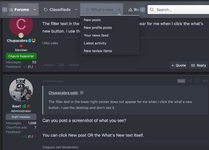
The filter text in the lower right corner does not appear for me when I click the what's new button. I use the desktop and don't see it.
 
I followed your instructions and clicked on the "what's new" menu item. This is what I see.

View attachment 37079
I see you clicked the dropdown button. Click the actual text "What's New" OR New posts in the dropdown under it. Two ways to get there. So you don't have to click the dropdown button
 
Back
Top Bottom