

You are using an out of date browser. It may not display this or other websites correctly.
You should upgrade or use an alternative browser.
You should upgrade or use an alternative browser.
How to Edit Thread
- Thread starter Colt6920
- Start date





- Messages
- 5,607
- Classified ads
- 5
You can only edit within 2 hours. If you are a reviewer on content contributor that limit is lifted. Otherwise you can delete the post/commentMade my first post/thread this morning and after the fact I can see I need to add additional information. Cannot find an "edit thread" linki anywhere. How do you edit a post/thread?
- Messages
- 60
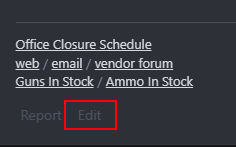
I've brought this up before ikeo. The edit button is too faint to see.
The edit and delete buttons are next to the report button. On the desktop the buttons are to the right of your Feedback score near your avatar.
The edit and delete buttons are next to the report button. On the desktop the buttons are to the right of your Feedback score near your avatar.
- Messages
- 5,607
- Classified ads
- 5
He was talking about the marketplace edit button not the forum. This was corrected.I've brought this up before ikeo. The edit button is too faint to see.
The edit and delete buttons are next to the report button. On the desktop the buttons are to the right of your Feedback score near your avatar.
If you hover over it should lighten up. I’ll take a look at it later.
Last edited:



Thank youHe was talking about the marketplace edit button not the forum. This was corrected.
If you hover over it should lighten up. I’ll take a look at it later.