



18+ Content Warning

By clicking Enter, you confirm you are 18 years of age or older and agree to comply with all applicable local, state, and federal laws.

Notice: Any content or member activity - including anything you may buy, sell, transfer, or discuss - must comply with current and upcoming laws.

Members are encouraged to stay informed: California Firearm Laws: 2026 Outlook & 2025 Recap . Responsibility for compliance rests solely with the individual member.

  • Welcome

    Welcome to CAguns

    Join California’s gun owner community. Create a free account to join discussions and explore member features.

How To: How to leave feedback as a Seller for a WTB listing?

22plinker

⚜️ Member
CAguns Supporter
📝 Contributor
2025 50+ 3 Mostest
Messages
574
Classified ads
7
Hello,

I sold an item to a member that listed a WTB ad but I am unable to leave them feedback for the transaction.

When I click on his feedback page and select the "type" as seller it lists all of my listings.

How do I leave feedback as a seller on a WTB listing?

Thanks

Matt
 
Last edited:
Hello,

I sold an item to a member that listed a WTB ad but I am unable to leave them feedback for the transaction.

When I click on his feedback page and select the "type" as seller it lists all of my listings.

How do I leave feedback as a seller on a WTB listing?

Thanks

Matt
Click on your listing that pertains to that transaction. Then you can leave feedback back.
 
Click on your listing that pertains to that transaction. Then you can leave feedback back.

I have no listing, it's a buyer that posted his own WTB ad and I sold to him.
 
Click on his then

It doesn't show "his", it only shows "my" listings when I select as the seller to leave feedback for him as the buyer.

Have you left feedback as a seller on a WTB listing before?

Matt
 
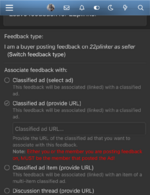
Click on the user and mark that you are the seller.

Paste the link for the classified ad and it should show as wanted when you post it. Give it a try and I’ll check it out

1748558271797.png
 
Click on the user and mark that you are the seller.

Paste the link for the classified ad and it should show as wanted when you post it. Give it a try and I’ll check it out

View attachment 64066

Bingo!

It wouldn't let me paste in the field before but after I selected the "(provide URL)" button it worked perfectly. (I have always used the drop down menu before..)

Thanks for the help!!!

Matt
 
Back
Top Bottom