18+ Content Warning

By clicking Enter, you confirm you are 18 years of age or older and agree to comply with all applicable local, state, and federal laws.

Notice: Any content or member activity - including anything you may buy, sell, transfer, or discuss - must comply with current and upcoming laws.

Members are encouraged to stay informed: California Firearm Laws: 2026 Outlook & 2025 Recap . Responsibility for compliance rests solely with the individual member.

  • Welcome

    Welcome to CAguns

    Join California’s gun owner community. Create a free account to join discussions and explore member features.

Implemented Search filter suggestion

renodoko

⚜️ Member
CAguns Supporter
2025
Messages
14
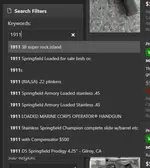
1742366139885.webp

Hey, guys, I work as a UX designer and I have some search filter suggestions on the classified page.
Right now, as soon as you search for something, the search box gives you some of the existing posts related to your search.
At first, this might seem useful, but when you just want to search all posts about 1911 so you type 1911 and press enter in the search box, It will bring up the very first post that's on the pre-populated list. (In this case, it will search "1911 38 super rock island" which is not what I intended to search)
I suggest keeping the search box simple so that we can get more search results and not just a single post.

Also, these filter options should be saved until the session expires.
It's annoying that every time when I switch between handgun -> Long gun lists, I have to apply the filter options again (I usually do region filter)
 
Last edited:
Also, these filter options should be saved until the session expires.
It's annoying that every time when I switch between handgun -> Long gun lists, I have to apply the filter options again (I usually do region filter)

There's the Saved Searches for that. When you switch categories, it loses state because different options become available and others are removed. Saved Search was custom built because of that issue.
 
There's the Saved Searches for that. When you switch categories, it loses state because different options become available and others are removed. Saved Search was custom built because of that issue.
I've been looking but sadly, I just can't find how to save a search. Could you give me some guidance please?
 
There's the Saved Searches for that. When you switch categories, it loses state because different options become available and others are removed. Saved Search was custom built because of that issue.
Didn't even know about this option exist. However doesn't matter which categories you are browsing, there will be filters like region that should be available for all categories that I think we could still save them until their session expires
 
Didn't even know about this option exist. However doesn't matter which categories you are browsing, there will be filters like region that should be available for all categories that I think we could still save them until their session expires
If you click on a category, you're essentially reloading the search list because it brings in new fields.

If you're at the top level of all categories, then region won't change. It's when you drill down that you lose state because it is a new query. I'll see if we can do it again, but i'm pretty sure it was a platform limitation based on how it loads. The fields that you're loading are all custom fields.

Saved Queries will store your category & options so you can return to it.
I've been looking but sadly, I just can't find how to save a search. Could you give me some guidance please?
This is a subscriber feature. It was custom developed and requires a bit of maintenance so its not available for free accounts.
 
This is a subscriber feature. It was custom developed and requires a bit of maintenance so its not available for free accounts.

At least I'm not crazy or going blind, I suspected it might be for subscribers only but, I am more inclined to believe I overlooked something! ;)

Thanks very much!
 
I suggest keeping the search box simple so that we can get more search results and not just a single post.
Thanks for the suggestion. I was waiting for our dev to get to it and now its tested and in. If you're on a keyboard press tab instead of enter or click outside the box and the results will load.

At least I'm not crazy or going blind, I suspected it might be for subscribers only but, I am more inclined to believe I overlooked something! ;)

Thanks very much!
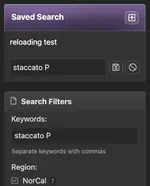
If you're a CAguns Supporter you get the Saved Search box just above your search filters. Hitting the + sign opens up an input to save your search fields. You get 5 as a supporter.

Screenshot 2025-03-26 at 12.29.29 PM.webp
 
Back
Top Bottom